
Recurring Inspection Scheduling: When Should Tasks Be Created?
Suppose a recurring safety inspection is scheduled for 10:00. When should the task appear in the system?
The short answer: for most field operations, create recurring inspection tasks shortly before they are due—not a week ahead and not at the exact scheduled minute. A horizon of roughly 24 to 36 hours gives mobile teams enough time to preload their work, operate offline, and plan a shift without creating too much mutable future data.
The obvious answer is 10:00. Why create a database record days in advance when the work does not yet exist in the real world? Generate it at the scheduled time, keep the database clean, and avoid having to update future records whenever the schedule changes.
We found that this answer is pointed in the right direction—and still wrong in practice.
The deeper problem was not simply when a row should be inserted. We were treating three separate questions as if they were one:
- When does the task exist in storage?
- When can a worker act on it?
- When does the system decide that it was missed?
Once we separated those questions, the design became both simpler and more reliable.
Why creating tasks early causes real problems
Pre-creating recurring tasks far into the future has an obvious cost: every schedule change can invalidate records that already exist.
Change the recurrence rule, time zone, assigned site, start date, or responsible team, and the system must decide what to do with all previously generated tasks. Should it update them, delete them, detach them from the schedule, or preserve them as historical facts?
These are not unusual edge cases. They are the source of an entire family of problems:
- duplicate occurrences after a recurrence rule changes;
- old tasks reappearing after they were removed;
- number collisions when future work is regenerated;
- phantom tasks caused by time-zone or start-date drift;
- large backfills when an inactive schedule is re-enabled.
That led us toward an attractive idea: stop creating future tasks altogether. Let the recurrence rule describe the future, and only create a real task when its scheduled time arrives.
It sounds clean. It also breaks the way field work actually happens.
The elegant solution that failed the field test
We stress-tested “create it exactly when due” against the ordinary realities of facility and warehouse operations. Four scenarios exposed the weakness quickly.
Workers often start before the scheduled time
A worker begins a morning round at 05:30, while the first inspection is scheduled for 06:00. At 05:32, the app shows nothing because the task does not exist yet.
The worker knows the route and starts an unscheduled checklist instead. At 06:00, the scheduler creates the official task. The system now has one completed checklist and one apparently missed inspection for the same work.
This is not an unusual exception. Starting slightly early is normal in shift-based operations.
Offline work needs a task before the connection disappears
Imagine a cleaning check in an underground car park. The worker has a connection at the start of the shift, loses it on site, completes the checklist with photos, and reconnects later.
An offline-first app needs enough information in advance to render the form, identify the task, store answers, attach media, and later synchronize everything safely. If the task is created only at the scheduled minute, the device may never receive it.
Allowing the device to create the official task is not a simple escape hatch. Task identity, ownership, generated form fields, numbering, and conflict resolution often depend on the server. Two devices must not both believe they successfully claimed the same work.
Dispatchers plan work before it becomes due
“Who is doing next Tuesday’s inspection?” is a question about a future fact, not a visual preview.
If future occurrences are purely virtual, there may be nowhere to store a one-off assignment, a skip decision, or a reason that a particular visit cannot happen. A recurrence rule can predict that a slot will exist, but it cannot carry every operational decision made about that individual slot.
Pre-creation is also a durability buffer
Creating tasks ahead of time is not only about planning. It protects the system from downtime.
With a short forward horizon, tomorrow’s work is already available if the scheduler is delayed for several hours. With a zero-minute horizon, every occurrence depends on the scheduler running at precisely the right time. The system then needs catch-up logic, restart reconciliation, and protection against permanent gaps.
In other words, removing the buffer creates new machinery whose job is to rebuild the safety the buffer provided for free.
How other tools handle recurring tasks
There is no universally correct way to create the next occurrence. Different products choose different models because they optimize for different kinds of work. The examples below are representative rather than exhaustive.
1. Advance the same task
Todoist’s recurring dates move the same task forward when it is completed. The recurrence can follow either the original schedule or the completion date. If an overdue task has passed multiple scheduled occurrences, Todoist moves it to the next future date rather than creating every missed instance.
That is a sensible design for personal reminders and habits: the list stays uncluttered and the user always sees the next thing to do. It is less suitable for inspections where each expected occurrence must remain independently explainable. A missed Tuesday inspection cannot simply collapse into Friday’s next task.
2. Create the next task when the current one is completed
ClickUp’s “When complete” option creates the next recurrence when the current task closes. Todoist offers a related completion-based pattern with its every! syntax, where the next date is calculated from when the task was completed.
This works well when the interval should begin again after the work is actually performed—for example, “service this machine again 30 days after its last service.” The trade-off is that an uncompleted task can stop the chain from advancing, and schedule-based misses are harder to represent as separate expected events.
3. Create a new task when the scheduled time arrives
Linear recurring issues generate a new issue after its due date passes. ClickUp’s “On schedule” option similarly allows recurrence to follow the schedule instead of waiting for completion.
This model preserves separate occurrences and keeps unfinished work from blocking the next task. It fits project and team workflows where a new issue can safely appear at the scheduled boundary. For offline field operations, however, creation at the boundary may be too late: the worker’s device might need the task, form, assignment, and attachments before it loses its connection.
4. Generate work ahead of time with a lead window
Enterprise maintenance systems often create work orders before they are due. IBM Maximo lets planners configure lead time so preventive-maintenance work orders are generated early. ServiceNow Planned Work Management also uses lead time to calculate when work can start and when it is due.
This is valuable when teams must reserve technicians, stage replacement parts, group work orders, or obtain approval. The cost is more future state: schedule edits can affect many already-created work orders, so invalidation and reconciliation become more complex.
Why revault uses a shorter version of the lead-window model
revault sits between a personal task manager and a full maintenance-planning system. A scheduled inspection must exist early enough for a field device to preload it, for a supervisor to assign it, and for the operation to survive temporary scheduler downtime. But a routine cleaning or safety checklist usually does not need weeks of parts planning or approval queues.
That is why our preferred design uses a short lead window—roughly 24 to 36 hours—rather than either seven days or zero. It keeps a full shift available offline while limiting the amount of future state that can be invalidated by a schedule change. Beyond that window, the calendar can show read-only projections calculated from the recurrence rule.
The better model: three zones of time
The answer is not to generate a week of fully actionable work, nor to wait until the exact scheduled minute. It is to divide time into three zones.
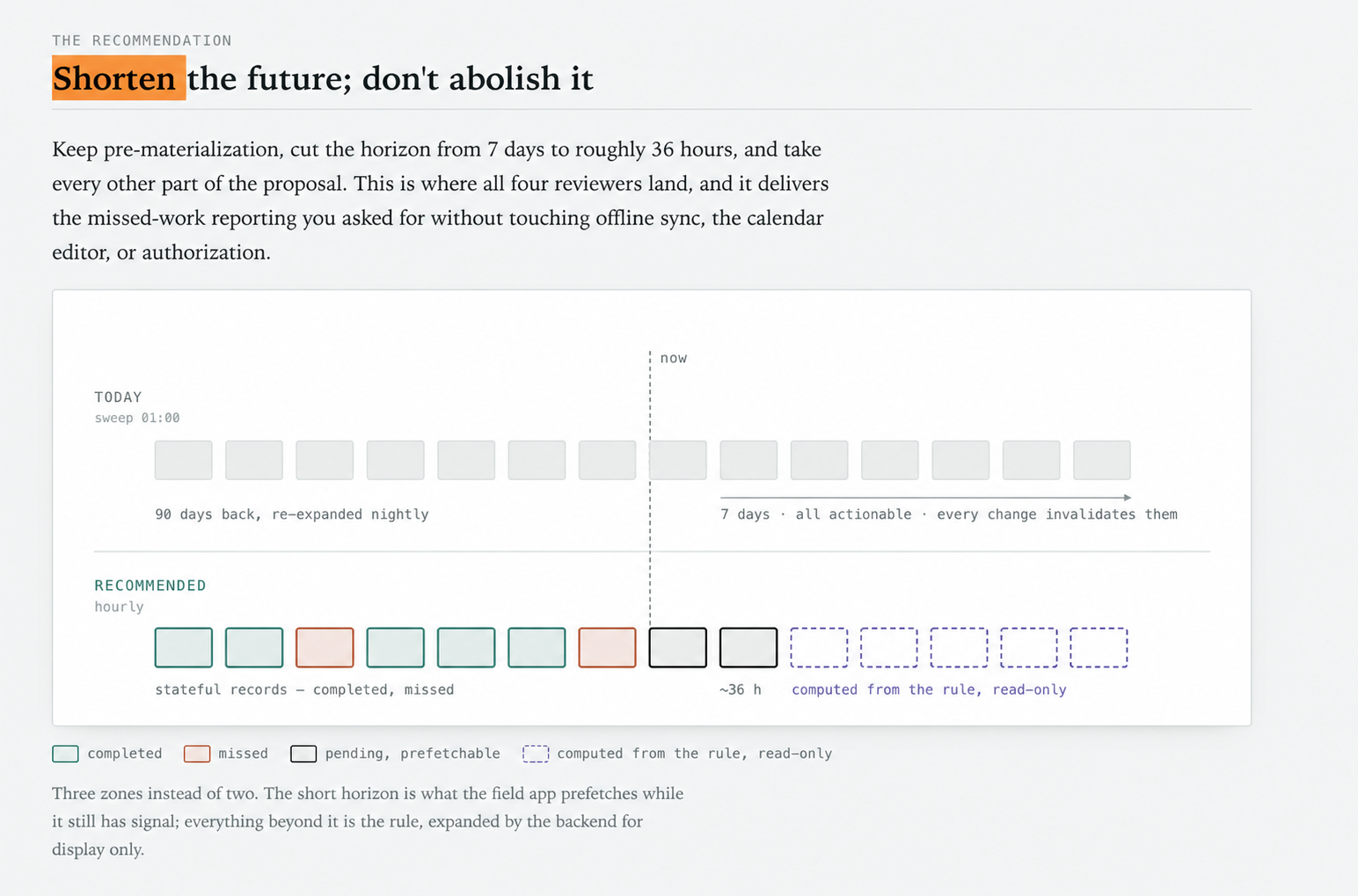
The recommended model keeps a short operational buffer while calculating the distant future from the recurrence rule.
1. The recorded past
Completed, skipped, satisfied, and missed work exists as durable records. These records are evidence and should not be rewritten when the recurrence rule changes later.
2. The actionable near future
Tasks within a short horizon—roughly a day and a half in our case—are materialized and available to the field app. This is long enough to prefetch a complete shift and survive a day of scheduler downtime, while keeping the number of records affected by schedule edits small.
3. The projected future
Everything beyond that horizon is calculated from the recurrence rule for calendars and planning views. These projected occurrences are read-only. They do not yet have task IDs and cannot be started or completed.
If a dispatcher needs to make a concrete decision about a projected slot, the system can materialize that specific slot early. This preserves planning without turning every distant occurrence into mutable database state.
A deadline is not the next recurrence
Knowing whether work was missed requires a real deadline.
A common shortcut is to say that one occurrence remains on time until the next occurrence begins. That produces absurd results at both ends of the frequency spectrum. An annual inspection would remain “on time” for almost a year, while a daily cleaning might not be reported as missed until the next day. The last occurrence in a finite series may have no next occurrence at all.
Each schedule instead needs an explicit grace period that reflects its operational meaning. A daily task might close at the end of a shift. A weekly check might close at the end of the scheduled day. A regulatory inspection may need a separately configured deadline and advance warnings.
When the task is materialized, its closing time should be frozen onto the record. A later edit to the schedule must not retroactively change whether past work was on time.
Derive “missed”; do not depend on a status job
It is tempting to run a background job that changes every overdue task from pending to missed. But then the truth of the audit record depends on that job running on time.
A more resilient definition is derived from facts:
A scheduled task is missed when it has not been completed and its action window has closed.
The scheduler may still send alerts or prepare reports, but a delayed notification job cannot corrupt the underlying answer. The same principle helps with offline completions: record when the work was performed separately from when the server received it, and judge timeliness using the performance time.
This also gives every client the same answer. The mobile app, calendar, agenda, and reports should not each invent their own overdue rules from different timestamps.
A watermark helps, but reconciliation keeps it safe
Repeatedly expanding months of recurrence history just to discover that nearly every row already exists is wasteful. A watermark—“materialized through this point”—lets the scheduler continue from where it stopped.
But the watermark should be an optimization, not the only source of truth. If it advances incorrectly or a transaction partially fails, relying on it alone can create a silent and permanent hole.
The robust combination is:
- advance the watermark in the same transaction that creates the tasks;
- enforce a unique identity for each schedule, time slot, and location;
- periodically re-expand a bounded window and insert any missing occurrences idempotently;
- move the watermark forward safely when a paused schedule is reactivated, rather than generating months of instantly missed work.
Efficient normal operation and self-healing are both necessary. In an audit trail, a duplicate is bad; an invisible missing expectation can be worse.
Absence is not a decision
Two additional states became important during the design review.
The first is skipped with a reason. “No access,” “equipment out of service,” and “site closed” are considered operational decisions. If the task simply disappears, the record cannot distinguish a deliberate decision from neglect.
The second is satisfied by another task. A worker may complete an equivalent inspection early or through an unscheduled checklist. Marking the scheduled slot as missed would make the system contradict its own photographic evidence. Linking the slot to the work that satisfied it preserves both timestamps and both records.
This leads to a useful rule for compliance-oriented systems: a decision should be represented by a durable fact, not by the absence of a row.
What we would build first
The most valuable part of this work does not require changing the materialization horizon at all.
Our implementation order is:
- Introduce a real, configurable closing time and freeze it onto each scheduled task.
- Define missed work on the server from completion and closing-time facts, and make every client consume that answer.
- Add notifications without making notification timing part of the truth.
- Shorten the forward horizon and run materialization more frequently.
- Add a transactional watermark with a bounded reconciliation backstop.
- Move calendar projections to one backend recurrence engine with strict query limits.
This sequence delivers missed-work reporting first—the user-facing outcome—while isolating the more contested scheduling changes.
The lesson
Our original instinct was aimed at the right problem. Creating too much future state does produce invalidation bugs. But the solution is not to abolish the future entirely.
Create enough near-future work to support shifts, offline devices, dispatcher decisions, and scheduler downtime. Keep the distant future virtual and read-only. Give every occurrence a real operational deadline. Derive missed work from durable facts. And retain reconciliation even after the normal path becomes efficient.
The key question is not “At what exact minute should we insert the row?” It is:
What information must exist, for whom, and for how long, so that the system remains useful in the field and truthful afterward?
That is the scheduling problem worth solving.
Frequently asked questions
When should recurring inspection tasks be created?
For offline or shift-based field teams, create actionable tasks roughly 24 to 36 hours before they are due. Keep later occurrences as read-only calendar projections until someone needs to act on them.
How can software prevent missed inspections?
Give every scheduled inspection an explicit closing time and define a miss from durable facts: the task was not completed before its action window closed. Notifications can be delayed without changing that truth.
Should recurring maintenance tasks be generated far in advance?
Only when dispatchers need to assign, approve, or prepare those specific tasks. Otherwise, use a short actionable horizon and calculate the distant schedule from the recurrence rule. This reduces duplicate work and schedule-change errors while preserving planning visibility.
Put this model to work with revault
revault helps warehouse, logistics, manufacturing, and facility teams run recurring inspections, maintenance checks, and operational checklists without relying on paper, spreadsheets, or chat messages. Teams can capture work in the field, attach photos, follow up on issues, and keep a reliable record of what was completed—or missed.
If your recurring work is difficult to schedule, disappears when a device goes offline, or leaves you unable to explain a missed inspection, book a workflow review with revault. Bring one broken process; we’ll help you map a practical way forward.